Daron Klett
← Projects

A2P 10DLC Embeddable Registration

Designing a scalable compliance registration experience for businesses sending text messages in the U.S.

Company
Twilio
Role
Product Designer
Timeline
~1 year
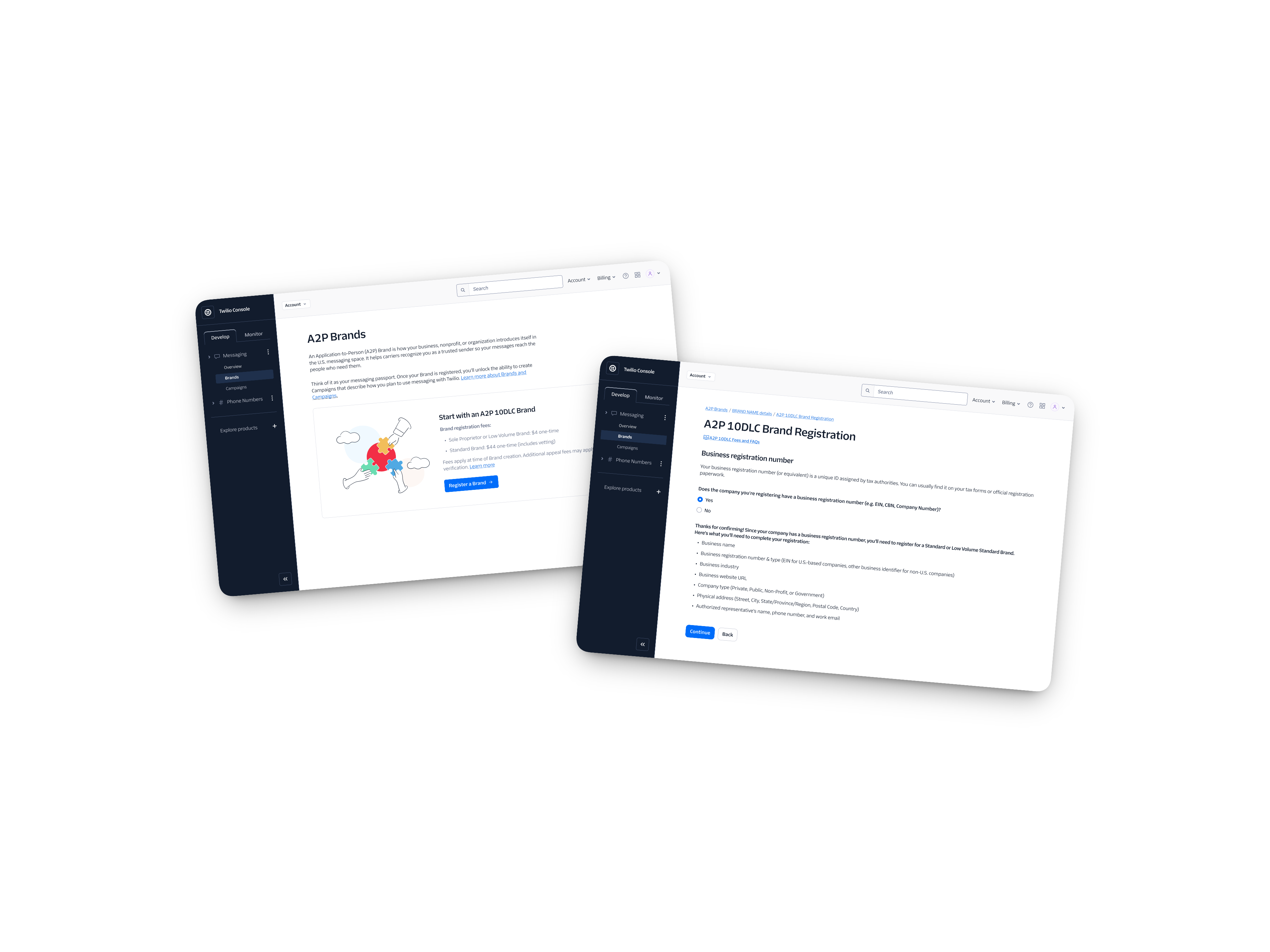
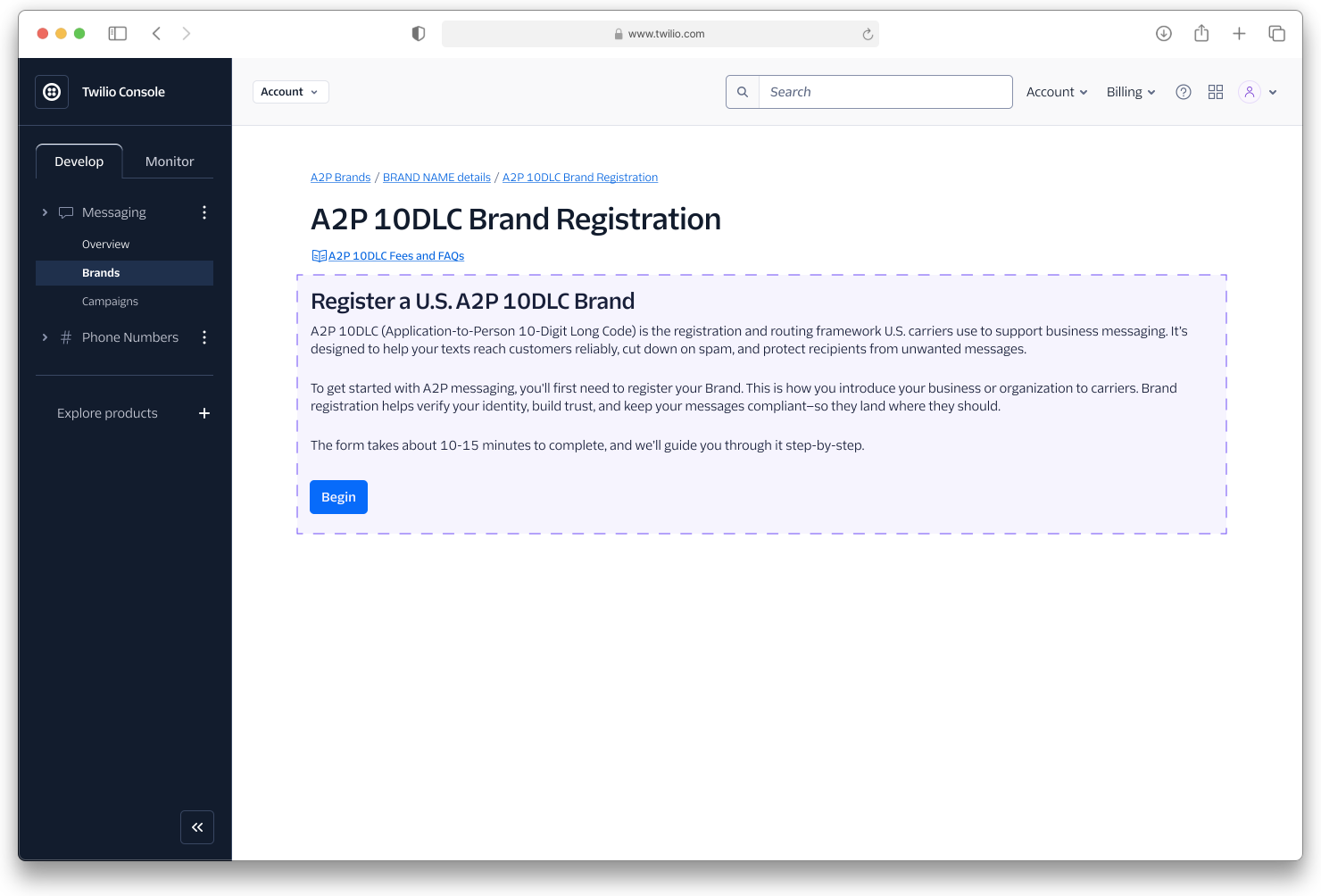
A2P 10DLC Brand registration flow in the Twilio Console
Context

What is A2P?

A2P 10DLC is a U.S. carrier requirement that any business sending application-to-person text messages must register through. It’s how businesses officially verify their texting programs with carriers. Skip it and your messages get blocked or flagged as spam before they ever reach a customer. It sounds straightforward. It is not.

The process has two distinct steps. First a business registers a Brand, which verifies who they are: legal name, EIN, business type, and contact info, all reviewed by Twilio and TCR (The Campaign Registry) in anywhere from minutes to days. Only once the Brand is approved can they register a Campaign, which describes how they plan to use messaging: use case, sample messages, opt-in method. Each Brand and Campaign registration flow had its own complexities in helping users achieve a successful first submission.

The problem

The same failures kept coming back.

After years of watching the same rejection patterns repeat, the picture became clear. The problems were not random. They were structural.
01

Upstream errors

Most rejections traced back to EIN formatting issues, mismatched business info, or sample messages that didn’t meet carrier standards.

02

Fragmentation

Compliance logic lived across multiple surfaces with no single source of truth. Every regulatory update meant fixing the same thing in several places.

03

Opaque status

Users had minimal visibility after submission. Generic error codes and vague labels left them unable to tell if they were waiting on TCR, under manual review, or had something to fix.

04

No workflow at volume

ISVs managing hundreds of registrations had no efficient, repeatable way to submit and track applications.

05

User confusion

Terms like “use case,” “opt-in,” and “campaign” meant different things to carriers and customers. That gap showed up directly in approval rates.

06

No guidance at the point of need

Fee info, FAQs, and requirements lived in external docs. Users had to leave the flow to find answers, and most didn’t come back.

My role

Deep domain knowledge, real constraints.

I was a product designer on Twilio’s compliance team for nearly two years before this project began. In that time I shipped iterative improvements to the A2P experience: better error codes, edit-and-resubmit flows, and clearer guidance, which reduced A2P support tickets by 45% and Brand Registration tickets by 25%. But every fix was reactive, solving problems after a failure had already happened rather than addressing why they kept occurring in the first place.

When product scoped a new embeddable registration experience, I led design from an initial cross-functional workshop through to launch. I ran that workshop with Product, Engineering, and Ops to map the information architecture and surface real constraints early: how TCR vetting worked, where OTP fit in, and what Persona could and couldn’t do. For larger ISV customers I restyled the embed entirely to match their brand. I did that for over a dozen partners.

Key design decisions

Making it work inside someone else’s system.

The flow lived inside Persona, a third-party identity-verification platform, embedded as an iframe in Twilio Console. Persona wasn't chosen arbitrarily. It automated identity verification, sped up carrier approvals, and gave ISVs a way to embed registration directly in their own platforms, making the UI constraints a worthwhile tradeoff for capabilities that would have taken years to build in-house.

I designed the Console shell around it: navigation, page headers, breadcrumbs, and all the in-between pages that connected each step. Before the Brand embed. After it. Before the Campaign embed. After that too. Each transition gave users context about what had just happened and what came next.

Persona’s constraints shaped a lot of what followed. As a mobile-first company, they don’t support tooltips, so I rewrote everything as inline helper text. No stepper inside the iframe, so I used the wrapper pages to show progress instead.

Twilio Console shell wrapping the Persona registration iframe, shown by the dashed boundary
The dashed border indicates the Persona iframe embedded within Twilio Console.

Making status legible.

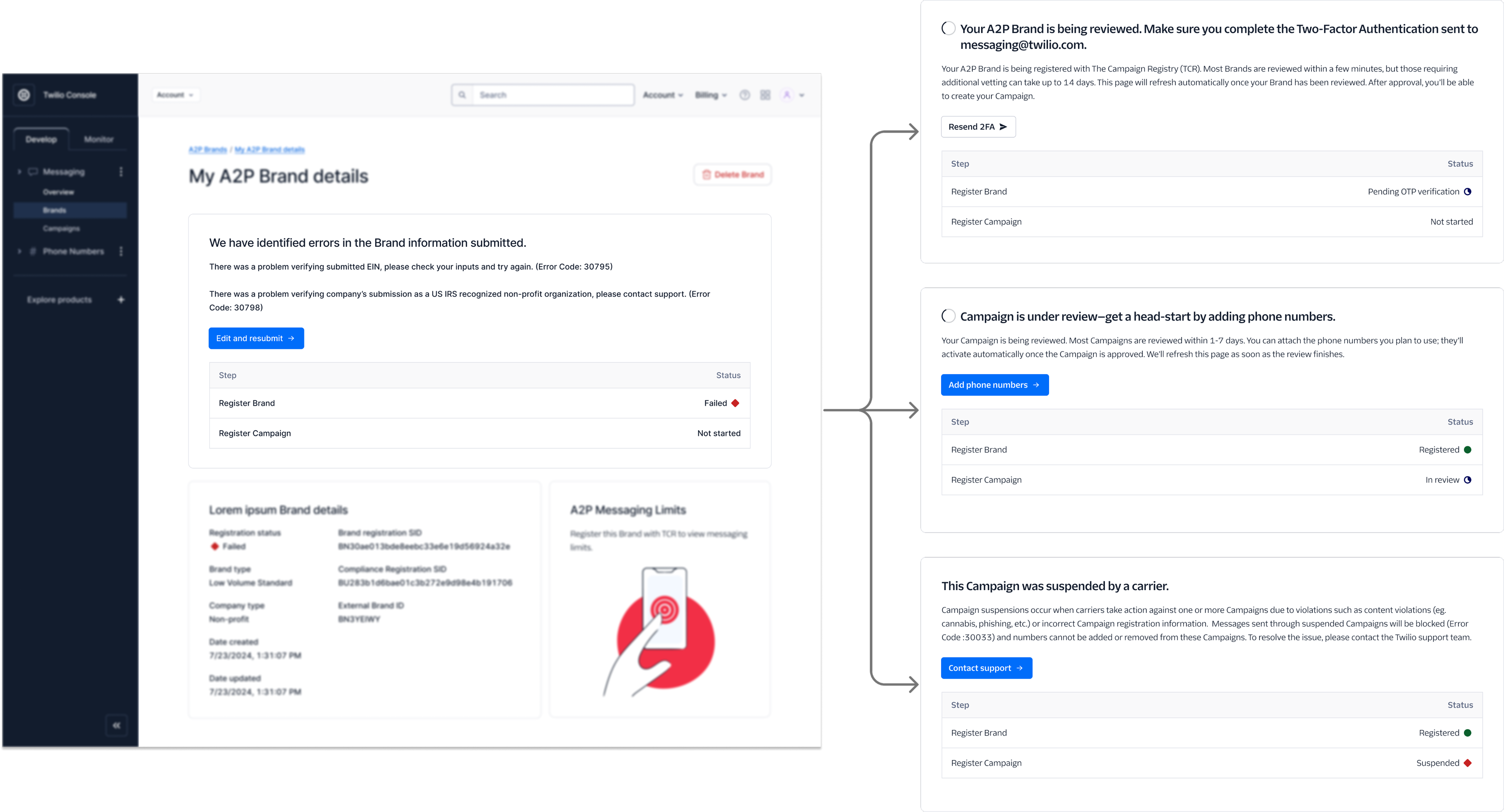
A2P registration involves multiple external reviewers. Twilio manually reviews some Brands and Campaigns; The Campaign Registry reviews others. Users could tell something was happening, but the experience was messy: generic codes, vague labels, no context. I redesigned every status state to say something useful: what stage you were in, what triggered a manual review, and what you could actually do while you waited.

The brand-details error state with arrows to three downstream status states: under review, campaign in review, and suspended
Four of the 19 status states I designed, each with specific context and a clear call to action.

Smarter fields, fewer errors.

Previously every user saw every field, whether or not it applied. I added conditional logic so the Brand flow adapted to who was filling it out. Sole proprietors saw a different flow than standard businesses. Public companies saw a stock-ticker field. Political organizations saw a Campaign Verify token. Everyone else did not. I also audited the existing fields and removed seven that three years of regulatory change had made unnecessary. The form went from showing everyone everything to showing each user only what was relevant.

Catching errors before they happen.

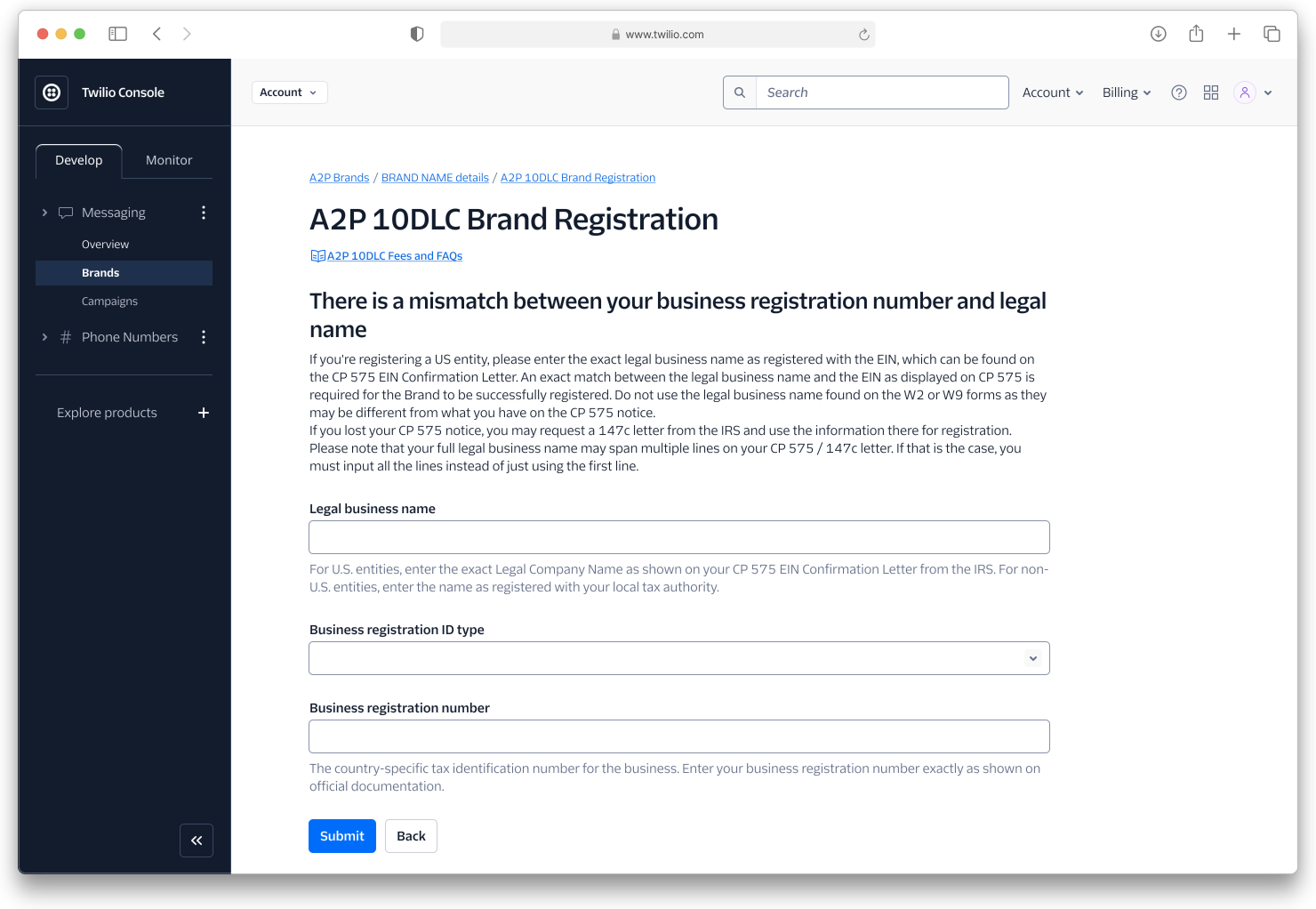
The single biggest cause of Brand rejections was a mismatch between the legal business name and the EIN. Instead of letting users submit and find out days later, I added background verification that ran as soon as both fields were entered, surfacing a mismatch immediately with clear guidance to fix it before submission. I also ran usability testing to find the right language for fields like “business registration number,” a term that meant different things to different users. Getting that one label right removed a whole category of confusion.

A2P Brand Registration screen explaining the mismatch between business registration number and legal name, with inline guidance and fields

Pushing back on “just read the docs.”

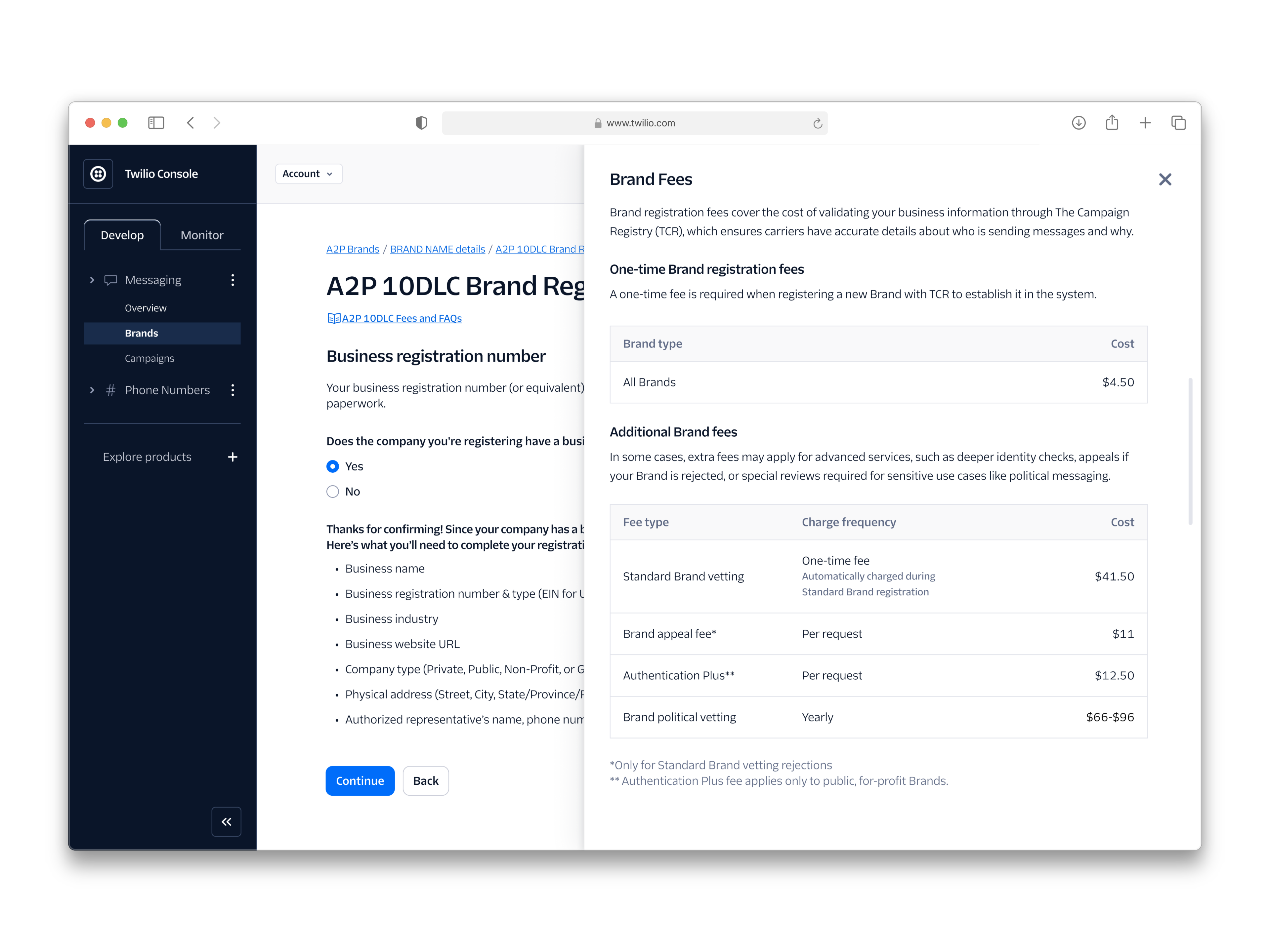
Product and Engineering kept saying users could find fee information and FAQs in the documentation. I disagreed. A user mid-registration shouldn’t have to open a new tab to understand what they’re signing up for. I built a baked-in side modal that surfaced fees, FAQs, and relevant context without pulling users out of the flow.

The A2P Brand Registration flow with a baked-in side modal surfacing Brand fees, registration costs, and FAQs without leaving the flow
The in-flow side modal surfacing fees and FAQs without pulling users out of registration.

Dynamic guidance in the Campaign flow.

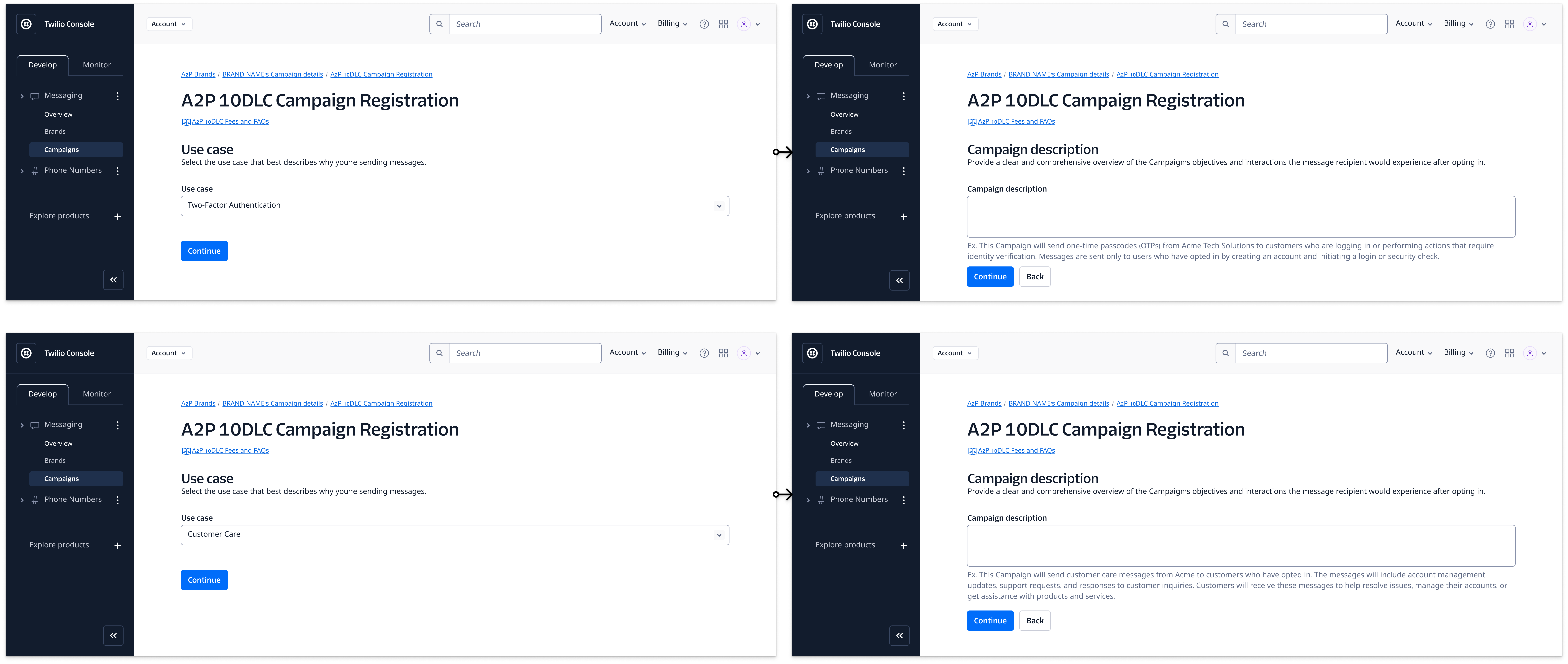
For Campaign fields I added contextual helper text that changed based on the use case selected at the start. I manually mapped unique guidance for all 21 use cases, with sample answers for fields like campaign description and sample messages. Opt-in collection is one of the most confusing parts of A2P, so instead of describing what compliant opt-in looks like, I added a visual that updated dynamically based on the method selected. Showing instead of explaining cut down a whole category of submission errors.

Two Campaign use cases (Two-Factor Authentication and Customer Care), each generating unique example text for the campaign description field
Two of the 21 use cases, each generating unique example text across every Campaign field.
Designing alongside the API

Console was only half the product.

Plenty of ISVs never touched Console. They registered Brands and Campaigns for their customers straight through Twilio’s API. So every design change had an API side, and I worked through it with engineering. That meant knowing which fields the API required versus what the UI asked for, how Customer Profiles and supporting documents get attached in Trust Hub, and how status changes reach ISVs through webhooks.

The error codes I rewrote showed up in a Console banner and in an API response, so they had to make sense in both. Understanding the API is also what made the embeddable make sense. It gave ISVs a middle path between building their own UI on the API and sending customers to Console.

Outcomes

What shipped, and what it led to.

The Persona embeddable shipped, and over a dozen ISV partners put it to work. It proved the embed could flex across brand contexts without breaking the underlying compliance logic. The Console side, including the redesigned status states, was set aside when the project shifted to One Console. Nothing was wasted, though. The architecture and patterns I built became the starting point for One Console’s onboarding.

Reflection

What three years in one problem space teaches you.

The most impactful design decisions are often the least visible ones. The side modal nobody asked for. The status screen that told you exactly why you were waiting. The 21 sets of example text that took longer to map than anyone expected. None of those show up in a hero screenshot. All of them made the experience meaningfully better.

Working inside Persona’s constraints also changed how I think about design systems. You don’t always get to build in your own backyard. Sometimes the job is figuring out what’s possible within someone else’s rules, pushing back when it matters, and making it feel seamless anyway.

Next project

One Console: Unified Compliance →

02 / 03
© 2026 Daron Klett Designed & built in Raleigh, NC