Daron Klett
← Projects

One Console: Unified Compliance

Bringing eleven fragmented registration types under a single compliance home, and the Persona-based onboarding flows I owned inside it.

Company
Twilio
Role
Product Designer
Timeline
~3 months
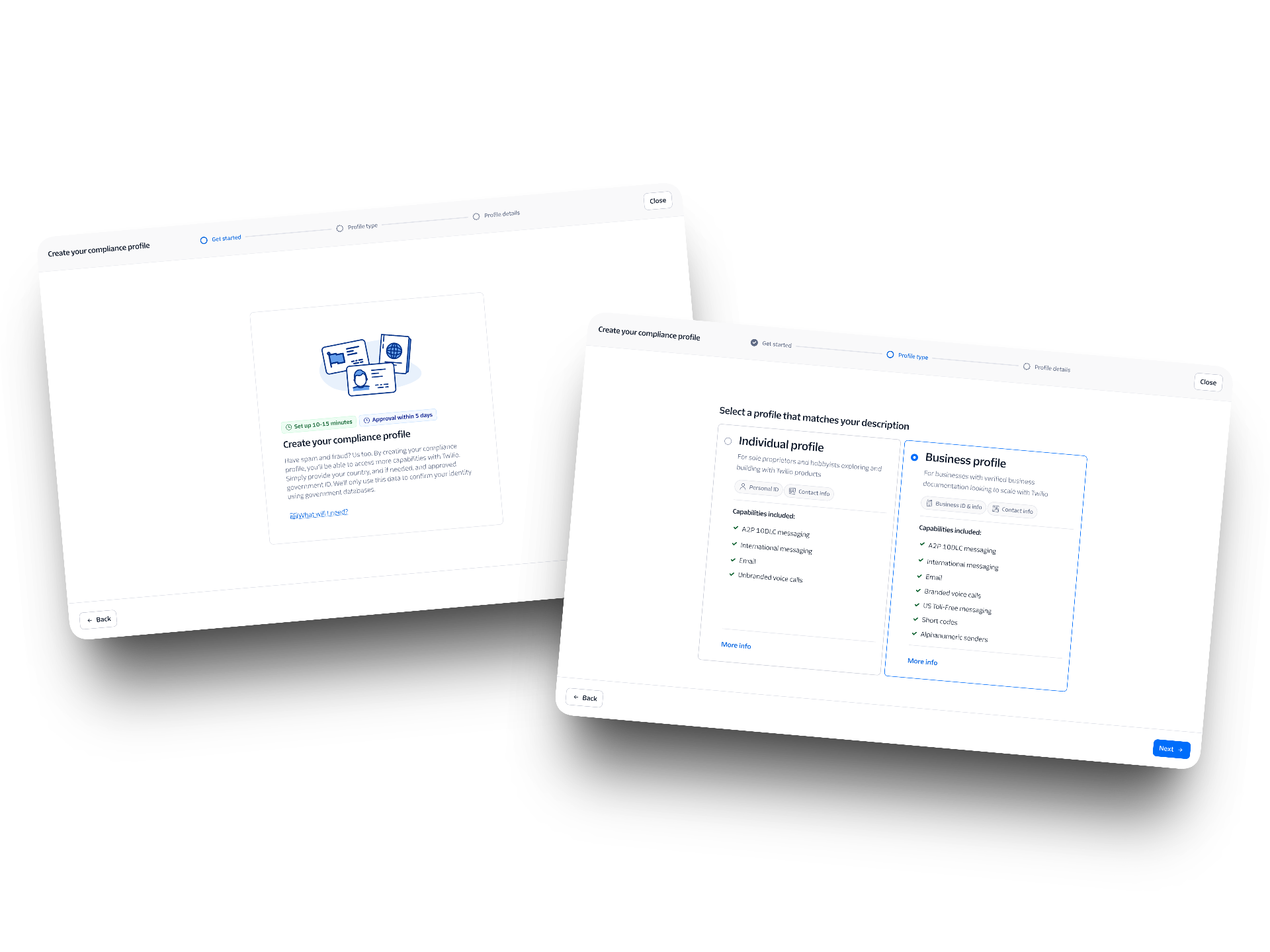
The One Console compliance-profile flow: a Get started intro screen and the Profile type step where users choose between an Individual and Business profile
Context

Eleven front doors to the same building.

Years of evolving regulations had turned Twilio's compliance experience into a fragmented collection of workflows, making it difficult for customers to understand what was required and how to get compliant.  A2P, toll-free, short code, and the rest, eleven registration types in total, each had its own entry point, its own vocabulary, and its own idea of what a “profile” was. A customer who needed more than one had to learn the system more than once. There was no single place that answered “what’s my compliance status, and what do I do next?”

One Console set out to fix that: unify all eleven types under Trust Hub as a single compliance home, with a more linear onboarding flow that carried a user from profile creation straight through to registration.

Every flow ran through Persona, a third-party identity verification platform embedded in Console. Persona gave Twilio real identity verification tooling without building it from scratch. That mattered most for the Primary Customer Profile, where verifying who a business is is the step. The tradeoff was strict rules about what the embed could do and when.

My role

The Persona expert in the room.

I co-designed the compliance onboarding experience and brought about three years of hands-on compliance work to the team. I owned the core registration flows:

  • Primary Customer Profiles, Individual and Business
  • Secondary Customer Profiles
  • A2P 10DLC Brand registration
  • A2P 10DLC Campaign registration
  • Regulatory Compliance registration

My role was also connective. I’d already designed the A2P embeddable, so I knew how Persona actually behaved, including which screens had to come first for the embed to work at all. The team consulted me on screen order and on fitting the embed into flows I didn’t own.
Owned

PCP Individual & Business, SCP, A2P Brands, A2P Campaigns, Regulatory Compliance

The core onboarding flows feeding Trust Hub, all built on Persona embeds I sequenced and wrapped.

Advised

Embed sequencing across the team

The team consulted me on screen order and on making the Persona embed fit flows I didn’t own.

The PCP flow

Rebuilding profile creation as an embed.

The Primary Customer Profile is the foundation every registration type sits on, it’s where a business establishes who it is before it can register anything. The existing flow (which I previously designed) worked fine. My job wasn’t to fix a broken experience; it was to bring it into the unified, Persona-based architecture so profile creation behaved consistently with everything else under Trust Hub.

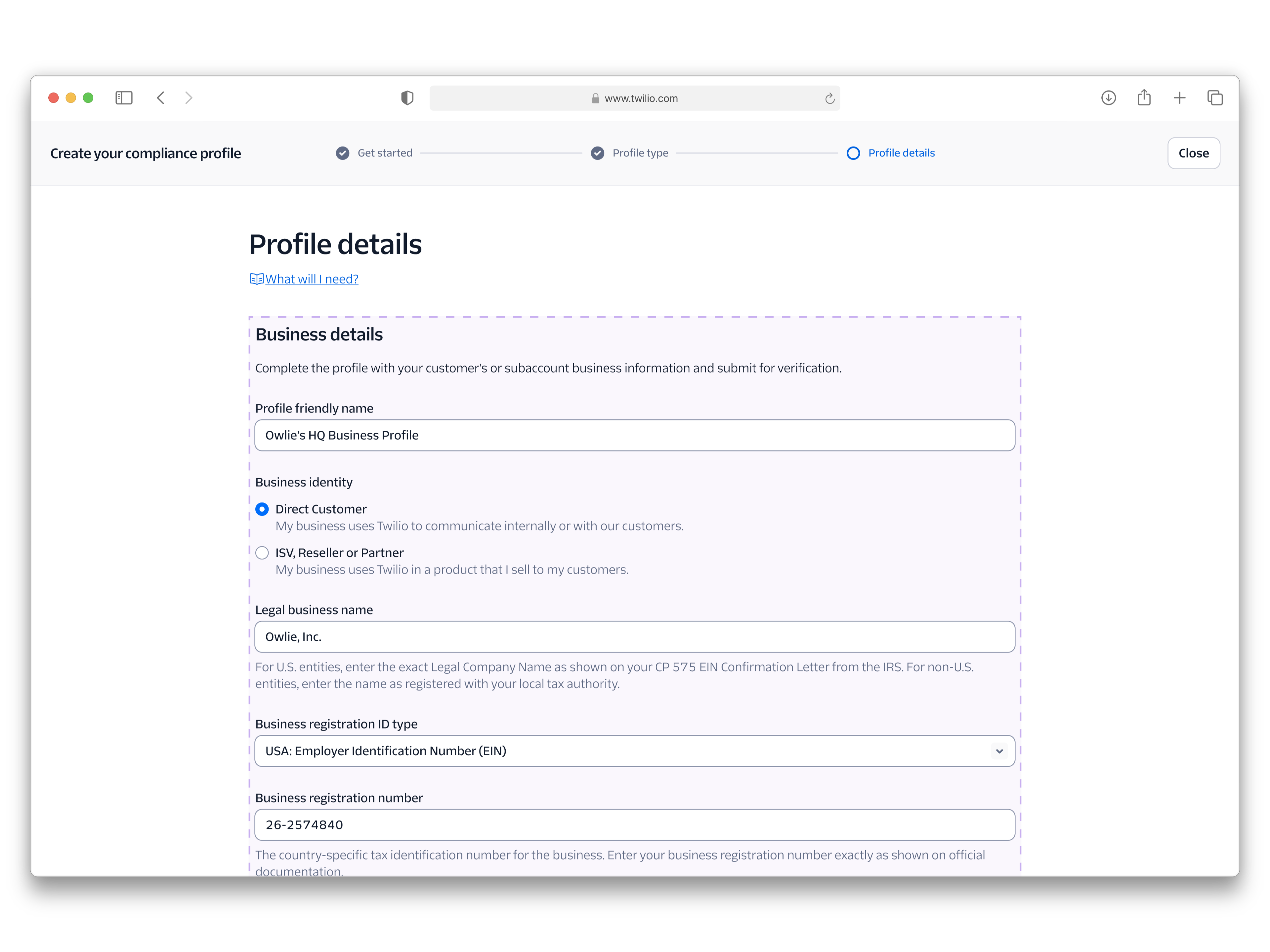
So I rebuilt PCP creation as a Persona embed, applying the same wrapper-and-embed model I’d established on A2P: a Console shell handling the heading, progress, and the connective pages, with the Persona iframe carrying the form itself. The flow moves from an intro and plan selection, through profile details with conditional fields and inline error handling, to an authorized representative step, notifications and terms, and finally a review → pending → approved sequence.

The Profile details step of PCP creation: a browser window showing the Console shell wrapping the Persona embed, with the dashed boundary around the Business details form
The dashed border indicates the Persona iframe.
01

Intro & plan selection

Orienting the user before the embed loads.

02

Profile details

Conditional fields and inline error states inside Persona.

03

Authorized rep

Capturing the person accountable for the profile.

04

Notifications & terms

Consent and contact preferences before submission.

05

Review

A last legible summary of everything entered.

06

Pending → approved

Status states that say what’s happening and why.

Why sequencing mattered

The embed dictates the order.

A Persona embed isn’t a flexible component you can drop anywhere. It expects certain information to exist before it loads and hands control back at specific points. Get the surrounding screens out of order and the embed either has nothing to work with or strands the user mid-verification. That constraint is invisible until you’ve hit it, which is why the team came to me: I’d already mapped it on A2P.

That experience carried over literally, not just conceptually. The Persona embeds I built for the A2P embeddable were reused directly in One Console. The architecture I’d worked out, what the shell owns, what the embed owns, and the order the connective pages have to follow, became the template the unified onboarding flows were built on.

Speed

Three months, start to handoff.

I had three months on One Console. That didn’t leave room for a textbook process. We made calls fast and reused what already worked, and lifting the A2P embeds straight into the new flows saved us from starting over. The team took it to Beta after I left.

Reflection

Expertise is a kind of deliverable.

Getting A2P Brands and Campaigns onto Persona took 12 months and numerous rounds of iteration. That was the slow part. I worked through the embed’s constraints with engineering one screen at a time.

Once that groundwork existed, we moved fast. PCP Individual and Business, SCP, Toll-Free, Short Codes, Alphanumeric Sender IDs, and Branded Calling all moved onto Persona in 3 months. That’s 7 programs in a quarter of the time it took to get A2P there.

One Console reached Beta after I left. The foundation was mine. The embeds I’d already shipped went straight into a new context, and the rest of the team built on them.

Next project

ESG Impact Investing →

03 / 03
© 2026 Daron Klett Designed & built in Raleigh, NC